If you are asking which proxy type do I need, the safest answer is not “buy the most expensive proxy.” The safest answer is to match the route to the job: VPN for device-wide privacy, datacenter for speed and low cost, residential for consumer-style IP reputation, ISP/static residential for stable sessions, and mobile only when a mobile carrier IP actually matters.
Use this selector as a routing decision framework. It is not a bypass promise. A proxy can change the visible route and IP source. It does not override laws, platform rules, account policies, security systems, browser fingerprinting, or the need to use official APIs when those are the right path.
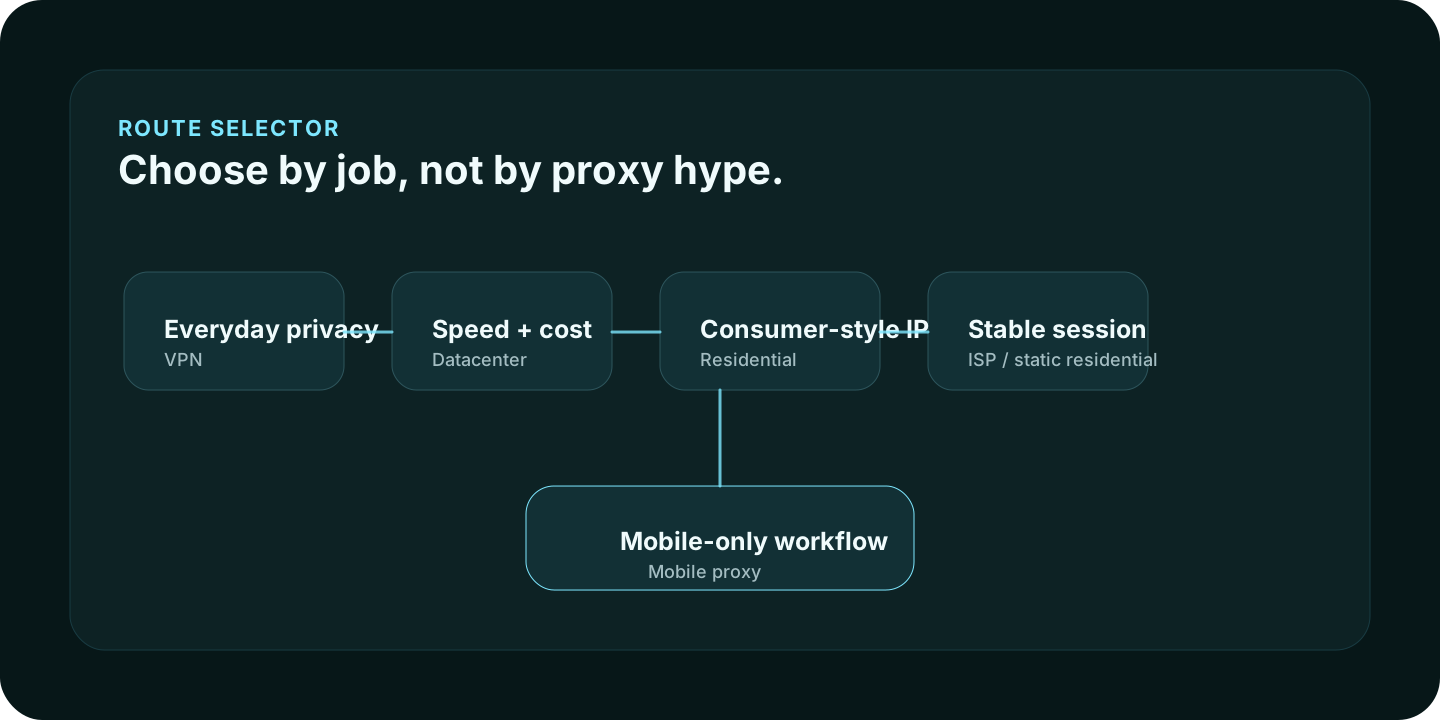
Quick answer
| If your job is… | Start with… | Why |
|---|---|---|
| Everyday privacy, public Wi-Fi, or simple location masking | VPN | One encrypted device-level tunnel is easier than per-app proxy routing. |
| Fast, cheap, low-sensitivity automation | Datacenter proxy | Usually lower cost and high speed, but easier to classify as hosting infrastructure. |
| Public web research where consumer IP reputation matters | Residential proxy | Routes through consumer-style ISP networks instead of datacenter networks. |
| A long browser session that should keep one region and IP | ISP/static residential proxy | Residential-looking IP with more session stability. |
| Mobile app or carrier-specific testing | Mobile proxy | Use only when a mobile carrier route is genuinely part of the workflow. |
The decision questions
Ask these before buying anything:
- Does the whole device need privacy, or only one app?
- Does the target accept datacenter IPs?
- Does the session need to stay on one IP?
- Does the location need to be country-level, city-level, ASN-level, or mobile-carrier-level?
- Will the browser profile match the route?
- Are you allowed to use a proxy for this workflow under law and platform policy?
VPN vs proxy
Choose a VPN when the problem is whole-device privacy: coffee-shop Wi-Fi, ISP visibility, simple location masking, or a single tunnel for normal browsing. A VPN is usually easier for non-technical users because it changes the network route at the device or OS level.
Choose a proxy when the job is app-specific or workflow-specific: one browser profile, one automation job, one scraper, one region, or one proxy type per task. A proxy is more flexible, but also easier to misconfigure.
Datacenter proxies
Datacenter proxies are usually the cheapest and fastest route. They are useful when the target does not care that the IP belongs to hosting infrastructure.
Good fit:
- low-risk scraping tests
- QA and development tasks
- price-sensitive automation
- bulk speed where reputation is not the deciding factor
Bad fit:
- targets that heavily classify datacenter ranges
- account sessions where consumer IP reputation matters
- workflows where “cheap” creates more blocks than savings
Residential proxies
Residential proxies route through consumer-style ISP IPs. They can be useful for public web research, geo checks, ad verification, localized SERP checks, and workflows where consumer-IP reputation matters.
The tradeoff is cost, ethics, and control. You need to understand how the provider sources traffic, what locations are available, whether sessions are sticky or rotating, and whether traffic expires.
ISP or static residential proxies
ISP proxies, often called static residential proxies, sit between datacenter and residential use cases. They are usually faster and more stable than rotating residential traffic while still looking closer to a residential ISP route.
Use them when a session needs one IP long enough to complete a workflow: dashboard QA, region-specific login testing, local search review, or app checks where rotating every request would break continuity.
Mobile proxies
Mobile proxies are not automatically “better.” They are usually more expensive and should be used when mobile carrier routing matters: mobile app QA, mobile-only behavior, carrier-specific testing, or workflows where the target legitimately expects mobile IPs.
If you are buying mobile proxies only because they sound stronger, pause. A mobile route can still conflict with browser timezone, account history, or device signals.
Provider direction by proxy type
Use provider pages after you know the type:
- For an all-around budget stack, compare IPRoyal.
- For granular catalog control, compare Proxy-Seller.
- For free or low-cost testing, compare Webshare.
- For low-entry-price experiments, compare Proxy-Cheap.
If you are not sure where to start, read the affordable proxy provider shortlist after choosing a route category.
Where IP Lookup fits
After connecting a proxy or VPN, open the IP Lookup and What’s My IP tool from the same browser profile. Check the visible IP, ASN, approximate location, and whether the browser context matches the route.
IP Lookup cannot prove that a setup is private everywhere. It can tell you what the current page can see about the route, and that is the first check before deeper browser or DNS testing.
Proxy type selection checklist
- Pick the job before picking the provider.
- Use VPN for simple device-wide privacy and proxies for app-specific routing.
- Use datacenter only when hosting-provider IPs are acceptable.
- Use residential when consumer-style IP reputation matters.
- Use ISP/static residential when session stability matters.
- Use mobile only when a real mobile carrier route is required.
- Check the final route with IP Lookup before using the workflow.
Common mistakes
Buying residential proxies when a VPN is enough
If you only want safer browsing on public Wi-Fi, a VPN may be simpler and less error-prone than proxy routing.
Buying mobile proxies because they sound stronger
Mobile is a category, not a magic privacy layer. If the workflow is not mobile-specific, mobile can be expensive overkill.
Rotating IPs during a session that should stay stable
Rotating residential traffic is useful for some public-data tasks. It can break login sessions, dashboards, carts, and workflows that expect continuity.
Ignoring browser context
A proxy changes the route. It does not clean up cookies, local storage, browser fingerprints, extensions, timezone, or language settings.
FAQ
Is a VPN a proxy?
A VPN and a proxy both route traffic through another server, but they are not the same setup. A VPN usually handles traffic at the device or OS level. A proxy is often configured per app, browser, or tool.
What is the most affordable proxy type?
Datacenter proxies are often the cheapest per IP. Residential bandwidth can be cheap per GB with certain providers. The most affordable choice is the one that works for the job without creating extra blocks or rework.
Should I use residential or ISP proxies?
Use residential proxies for rotating consumer-style IP access. Use ISP/static residential proxies when you need a stable IP that still has residential-like credibility.
Can IP Lookup tell me if my proxy is working?
It can show the visible IP, approximate location, ASN, and network details from the current browser session. That is a useful first test, but you should also check DNS, WebRTC, and browser signals when privacy or session consistency matters.
Methodology
How Aerod treats proxy type advice
- Separate route type from provider brand.
- Avoid promising anonymity from a proxy type alone.
- Prefer practical use cases over hype labels.
- Link to provider pages only after explaining the route decision.
- Pair proxy selection with IP and browser validation.