A VPN and Tor can both hide your normal public IP address from the website you visit, but they are built for different jobs.
Use a VPN when you want a practical encrypted route for everyday browsing, travel, public Wi-Fi, streaming, or apps outside the browser. Use Tor Browser when the priority is stronger anonymity and censorship resistance, and you can accept slower speeds, website friction, and stricter browser behavior.
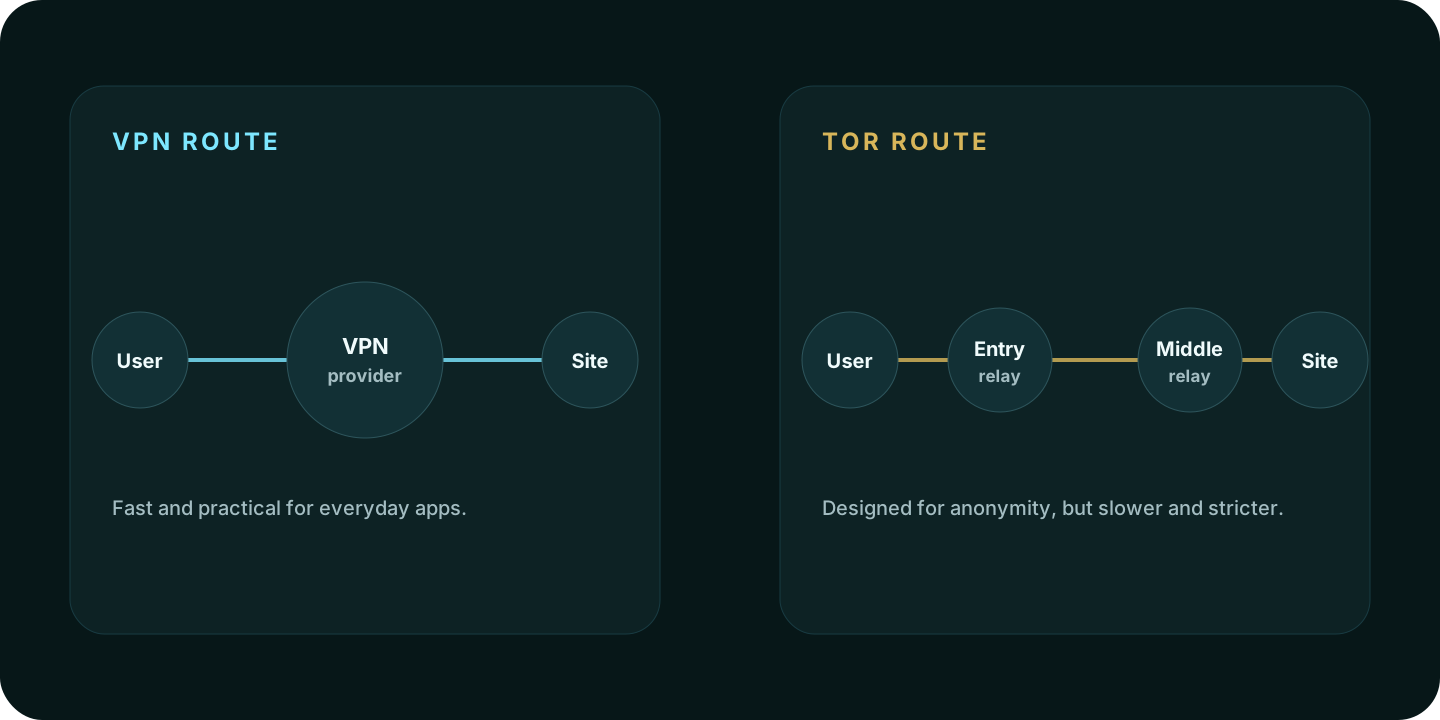
Quick answer
| Situation | Better starting point | Why |
|---|---|---|
| Public Wi-Fi, travel, streaming, normal browsing | VPN | Faster, easier to use across apps, and usually better for everyday traffic. |
| Strong anonymity, censorship resistance, sensitive browsing | Tor Browser | Designed to reduce linkability and route traffic through a relay circuit. |
| Banking, work dashboards, streaming accounts | VPN | Tor often triggers blocks, captchas, and unusual-login alerts. |
| Researching sensitive topics without tying them to your normal browser | Tor Browser | Use a separate Tor Browser session and avoid personal logins. |
| Hiding activity from the VPN provider itself | Tor Browser | Tor avoids putting the full browsing route under one VPN provider. |
How a VPN works
A VPN creates an encrypted tunnel between your device and a VPN server. Websites see the VPN server’s public IP address instead of your normal home, office, hotel, mobile, or ISP route.
That makes a VPN useful for:
- public Wi-Fi protection
- simple location masking
- avoiding local network snooping
- using one route across many apps
- streaming or travel scenarios where a normal browser still needs to work
- reducing what websites see about your normal ISP route
The tradeoff is trust. The VPN provider can become the organization handling the route. That is why privacy policy, jurisdiction, no-logs material, audit history, payment model, and app behavior matter.
How Tor works
Tor Browser routes traffic through a Tor circuit rather than one provider-operated VPN server. The goal is to reduce the ability of any single point to know both who you are and where you are going.
Tor is useful when:
- anonymity matters more than speed
- censorship resistance matters
- the browsing activity should be separated from your normal browser
- you can avoid personal logins
- you can accept website blocks, captchas, and slower performance
Tor’s protections depend on behavior. Installing extra browser extensions, resizing the browser in unusual ways, opening downloaded documents outside the browser, or signing in to personal accounts can weaken the privacy benefit.
Speed and usability
VPNs are usually easier for normal browsing because the route is shorter and the apps are designed for daily use. Tor can be much slower because traffic passes through multiple relays and websites sometimes treat Tor exit nodes as higher risk.
If the task is ordinary travel browsing or streaming, choose a VPN. If the task is sensitive research where anonymity matters more than speed, choose Tor Browser.
VPN plus Tor
Combining a VPN and Tor can be useful in narrow cases, but it also adds complexity. A bad configuration can make troubleshooting harder without improving privacy in a meaningful way.
Two common setups:
- Tor over VPN: connect to a VPN first, then open Tor Browser. Your ISP sees the VPN connection, and the VPN provider can see that you connect to Tor entry infrastructure.
- VPN over Tor: more complex, usually not needed for normal users, and often harder to configure correctly.
Most users should pick one tool for the job instead of stacking both by default.
What websites can still see
Even with a VPN or Tor, websites can still observe browser-side signals:
- user agent and browser family
- language and timezone
- screen and viewport behavior
- cookies and login state
- storage and permissions
- WebRTC behavior
- mouse, keyboard, and behavioral patterns
Use IP Lookup to check the visible route and WebRTC Leak Test to inspect WebRTC candidate exposure.
VPN or Tor decision checklist
- Use a VPN for everyday route privacy, public Wi-Fi, travel, and normal apps.
- Use Tor Browser when anonymity matters more than speed or convenience.
- Avoid personal logins when using Tor for sensitive browsing.
- Do not install extra Tor Browser extensions unless you understand the fingerprinting risk.
- Run IP Lookup after connecting to any VPN to confirm the visible route.
- Check WebRTC behavior in the browser you will actually use.
- Do not treat either tool as protection from phishing, malware, or account tracking.
FAQ
Is Tor better than a VPN?
Tor is better for anonymity-focused browsing. A VPN is better for everyday speed, streaming, travel, public Wi-Fi, and app-wide convenience.
Is a VPN safer than Tor?
They protect against different risks. A reputable VPN is easier to use safely for normal traffic. Tor Browser is stronger for anonymity when used correctly, but it is easier to misuse if you mix it with personal accounts or change browser behavior.
Should I use Tor for streaming?
Usually no. Tor is not designed for streaming, and many streaming services block or challenge Tor exit traffic.
Should I use a VPN before Tor?
Only if your risk model calls for it. Tor over VPN can hide Tor usage from a local network or ISP, but it also adds a VPN provider into the trust model.
Methodology
How Aerod compares VPNs and Tor
- Separate network-route privacy from browser and account identity.
- Treat Tor Browser as an anonymity tool, not a streaming or everyday browsing shortcut.
- Treat VPNs as route privacy tools that still need browser checks.
- Avoid recommending VPN-plus-Tor stacking unless the user has a clear reason.
- Link to IP and WebRTC checks after explaining the route model.